Online betting platforms have become increasingly popular, offering users the chance to engage in sports betting and casino games from the comfort of their homes. Batery Bet (https://batery-bet.in) markets itself as a trustworthy site for these activities, but recent user experiences suggest otherwise.


Suspicious Behavior with Withdrawals


One of the key complaints from users is the platform's inconsistent withdrawal policies. Users report that:


1. Quick Withdrawals in Losses: When they are losing money, withdrawals are processed almost instantly, giving the impression of a reliable system.


2. Delayed or Denied Withdrawals in Profits: The real issue arises when users start making even small profits. Withdrawals are held up for hours, and sometimes indefinitely, without adequate explanation or resolution.


A Personal Experience


A user recently shared their experience, stating:


After facing losses, withdrawals were processed immediately, which built confidence in the platform.


However, when the user made a small profit and attempted to withdraw, their funds were frozen for over 15 hours. Customer support provided no clear explanation, leaving the user frustrated and concerned about their money.


This pattern suggests a deliberate strategy to lure users into depositing more money while blocking profits when users try to cash out.


Customer Support Issues


Another common criticism is the lack of effective customer support. The platform claims to offer email and chat support, but many users report:


Automated or vague responses that do not address specific issues.


Long wait times or no response at all when dealing with withdrawal concerns.


Red Flags to Watch For


1. Unregulated Operations: It is unclear whether Batery Bet operates under proper licensing or regulatory oversight, raising questions about its legitimacy.


2. Predatory Practices: Immediate withdrawals during losses and delays during profits can be seen as a tactic to exploit users.


3. No Transparency: The site fails to provide users with clear reasons for delays or frozen withdrawals.


Conclusion: Proceed with Caution


While Batery Bet might offer attractive bonuses and promotions, users should be wary of the platform's unethical behavior. Without proper regulations and consistent user-friendly practices, it risks being labeled as a scam site.


Recommendations:


If you’ve been scammed, consider reporting the website to cybercrime authorities in your jurisdiction.


Share your experiences on platforms like Trustpilot or Reddit to warn other users.


Avoid depositing significant amounts of money into unregulated platforms like Batery Bet.


Alway

s prioritize your financial safety and gamble responsibly.

 

Dinesh Karthik Telugu, IPL 2020: దినేష్ కార్తీక్‌, అంపైర్‌ మధ్య తెలుగు సంభాషణ.. వీడియో వైరల్‌

Dinesh Karthik Telugu: ఐపీఎల్‌ 2020లో భాగంగా గురువారం కోల్‌కతా నైట్ రైడర్స్‌తో జరిగిన మ్యాచ్‌లో 6 వికెట్ల తేడాతో చెన్నై సూపర్‌కింగ్స్ గెలిచింది. ఇదిలా ఉంటే ఈ మ్యాచ్‌ మధ్యలో కోల్‌కతా క్రికెటర్‌ దినేష్‌ కార్తీక్‌, అంపైర్‌ షంషుద్దీన్ మధ్య తెలుగులో సంభాషణ జరిగింది. చెన్నై టీమ్‌కి చెందిన శామ్ కుర్రన్ బౌలింగ్‌ వేసిన తరువాత.. దినేష్ కార్తీక్ ‘వైడ్‌ కాదా..?’ అని అడిగారు. అందుకు స్పందించిన అంపైర్‌ షంషుద్దీన్‌.. ”లోపల, చానా లోపల, కొంచెం కూడా కాదు” అని సమాధానం ఇచ్చారు.(ఏపీలో పెట్టుబడులు పెట్టేందుకు సిద్ధం: పోస్కో )

ఈ వీడియో ప్రస్తుతం సోషల్ మీడియాలో వైరల్‌గా మారింది. షంషుద్దీన్ హైదరాబాద్‌కి చెందిన వ్యక్తి కాగా.. తమిళనాడుకు చెందిన దినేష్‌ కార్తీక్‌కి తెలుగు వచ్చా..? అని చాలా మంది ఆశ్చర్యపోతున్నారు. అందుకు స్పందిస్తున్న కొంతమంది దినేష్‌ కార్తీక్‌ పూర్వీకులు తెలుగు వారే అని.. మరికొందరేమో కార్తీక్‌కి తెలుగు, తమిళం, పంజాబీ, హిందీ, ఇంగ్లీష్‌ వచ్చొని కామెంట్లు పెడుతున్నారు. ( కరోనా అప్‌డేట్స్‌: తెలంగాణలో 1,531 కొత్త కేసులు.. 6 మరణాలు )


PAC Ranking 2020 Kerala Goa Chandigarh Best Governed States UTs - Sakshi

కేరళ అందాలు(కర్టెసీ: కేరళ టూరిజం)

పబ్లిక్‌ అఫైర్స్‌ ఇండెక్స్‌-2020 నివేదిక వెల్లడి

బెంగళూరు: సుపరిపాలన సాగిస్తున్న రాష్ట్రాల్లో కేరళ దేశంలోనే ప్రథమ స్థానంలో నిలిచింది. దక్షిణాది రాష్ట్రాలు తమిళనాడు, ఆంధ్రప్రదేశ్‌, కర్ణాటక తర్వాతి స్థానాలు ఆక్రమించాయి. ఇక అత్యధిక జనాభా కలిగిన ఉత్తరప్రదేశ్‌ రాష్ట్రం ఈ జాబితాలో ఆఖరి స్థానంలో నిలిచింది. ఈ మేరకు ఇస్రో మాజీ చైర్మన్‌ కె.కస్తూరిరంగన్‌ నేతృత్వంలోని స్వచ్ఛంద సంస్థ ‘‘ది పబ్లిక్‌ అఫైర్స్‌ ఇండెక్స్‌ 2020’’ పేరిట శుక్రవారం ర్యాంకులు ప్రకటించింది. సుస్థిరాభివృద్ధి ఆధారంగా ఈ జాబితా విడుదల చేసినట్లు పేర్కొంది. సమానత్వం, అభివృద్ధి సూచిలో పెరుగుదల, సుస్థిరత అనే మూడు అంశాలను పరిగణనలోకి తీసుకున్నట్లు వెల్లడించింది. (చదవండి: రోడ్డు మీద వరి పండించాడు )


ఇందులో దక్షిణాది రాష్ట్రాలు ముందు వరుసలో ఉండగా, యూపీ, ఒడిశా, బిహార్‌ నెగటివ్‌ పాయింట్లతో అట్టడగున నిలిచినట్లు తెలిపింది. ఇక చిన్న రాష్ట్రాల కేటగిరీలో గోవా 1.745 పాయింట్లతో అగ్రస్థానం ఆక్రమించగా, మేఘాలయ(0.797), హిమాచల్‌ ప్రదేశ్‌(0.725) ఆ తర్వాతి స్థానాల్లో నిలిచాయి. కాగా మణిపూర్(-0.363)‌, ఢిల్లీ(-0.289), ఉత్తరాఖండ్‌ (-0.277) అత్యంత ఘోరమైన ప్రదర్శనతో వెనుకబడినట్లు పీఏసీ నివేదిక వెల్లడించింది. కేంద్రపాలిత ప్రాంతాల్లో చండీగఢ్‌(1.05) మొదటి స్థానంలో నిలవగా, పుదుచ్చేరి(0.52), లక్షద్వీప్‌(0.003), దాదర్‌ అండ్‌ నగర్‌ హవేలీ(-0.69), అండమాన్‌, జమ్మూకశ్మీర్(-0.50)‌, నికోబార్‌ (-0.30)తర్వాతి స్థానాల్లో నిలిచాయి.

 హైదరాబాద్: ఐపీఎల్ 2020 టైటిల్ ముంబై ఇండియన్స్ గెలిచే అవకాశం లేదని టీమిండియా మాజీ చీఫ్ సెలెక్టర్ ఎమ్మెస్కే ప్రసాద్ అన్నాడు. ఈ సారి నయా చాంపియన్ అవతరించే అవకాశం ఉందని అభిప్రాయపడ్డాడు. ప్రస్తుతం తెలుగు కామెంటేటర్‌గా వ్యవహరిస్తున్న ఎమ్మెస్కే.. శుక్రవారం కింగ్స్ ఎలెవన్ పంజాబ్, రాజస్థాన్ రాయల్స్ మధ్య జరిగిన మ్యాచ్ సందర్భంగా కామ్ బాక్స్‌లో ఈ వ్యాఖ్యలు చేశాడు.


సహచర కామెంటేటర్‌ కల్యాణ్‌తో సరదాగా టైటిల్ విన్నర్‌ను అంచనా వేసిన ఎమ్మెస్కే.. తన మనసులోని మాటను చెప్పాడు. ముంబై ఇండియన్స్ ఫైనల్ చేరుతుందని కానీ.. టైటిల్ మాత్రం ఇప్పటి వరకు అందుకోని జట్లకు దక్కుతుందని జోస్యం చెప్పాడు. ఏ టీమ్ అనేది చెప్పనప్పటికీ.. టైటిల్ గెలవని జట్లైన రాయల్ చాలెంజర్స్ బెంగళూరు, ఢిల్లీ క్యాపిటల్స్, కింగ్స్ ఎలెవన్ పంజాబ్‌లకు అవకాశం ఉందని పరోక్ష వ్యాఖ్యలు చేశాడు.

టీ20ల్లో ఎప్పుడూ ఏం జరుగుతుందో చెప్పలేమని, వరుస విజయాలతో దూసుకెళ్లిన జట్లకు కూడా పరాజయం తప్పదన్నాడు. గెలుపు గుర్రాలకు ప్రతీకూల పరిస్థితులు ఎదురవుతాయన్నాడు. పటిష్ట ముంబైని రాజస్థాన్‌ రాయల్స్‌ మట్టికరిపించిందని, 190కి పైగా పరుగులు చేసినా ముంబై విజయాన్నందుకోలేకపోయిందని ఈ మాజీ చీఫ్ సెలెక్టర్ తెలిపాడు. అలాంటి పరిస్థితి ఎదురైతే ముంబైకి కష్టాలు తప్పవన్నాడు. పైగా తటస్థ వేదికలో జరుగుతుండటం నయా చాంపియన్‌ అవతరించడానికి సానుకూలంశమని తెలిపాడు.

ఇక కింగ్స్ ఎలెవన్ పంజాబ్ జైత్ర యాత్రకు రాజస్థాన్ రాయల్స్ బ్రేక్ వేయడంతో ప్లే ఆఫ్ చేరే జట్టు ఏదో చెప్పలేని పరిస్థితి నెలకొందన్నాడు. శనివారం రాయల్ చాలెంజర్స్ బెంగళూరును సన్‌రైజర్స్ హైదరాబాద్ ఓడిస్తే ఆఖరి మ్యాచ్ పూర్తయ్యేవరకు ప్లే ఆఫ్స్‌లో నాలుగో బెర్త్ ఎవరిదో చెప్పలేమన్నాడు. ఇక ఫస్టాఫ్‌లో తెలిపోయిన కింగ్స్ పంజాబ్ సెకండాఫ్‌లో వరుసగా ఐదు విజయాలతో ప్లే ఆఫ్స్ దిశగా దూసుకెళ్లింది. కానీ ఆ జట్టు జైత్రయాత్రకు రాజస్థాన్ రాయల్స్ బ్రేక్ వేసింది. క్రిస్ గేల్(99) విధ్వంసంతో పంజాబ్ విధించిన 186 పరుగుల భారీ లక్ష్యాన్ని రాజస్థాన్ అలవోకగా చేధించి 7 వికెట్లతో సునాయస విజయాన్నందుకుంది.


దుబాయ్: ఐపీఎల్‌లో భాగంగా నిన్న కోల్‌కతా నైట్‌రైడర్స్-చెన్నై సూపర్ కింగ్స్ మధ్య జరిగిన మ్యాచ్‌లో తెలుగు వారు గర్వించే ఘటన ఒకటి జరిగింది. ఈ మ్యాచ్‌లో తొలుత బ్యాటింగ్ చేసిన కోల్‌కతా నైట్‌రైడర్స్ నిర్ణీత 20 ఓవర్లలో 5 వికెట్ల నష్టానికి 172 పరుగులు చేసింది. ఛేదనలో చెన్నై సూపర్ కింగ్స్ చివరి బంతికి విజయం సాధించింది. అయితే, కోల్‌కతా ఇన్నింగ్స్‌లో ఓ చూడముచ్చటైన ఘటన జరిగింది. శామ్ కరన్ వేసిన 19వ ఓవర్ ఐదో బంతి వికెట్లకు దూరంగా వెళ్లింది. దినేశ్ కార్తీక్ దానిని ఆడేందుకు ప్రయత్నించగా అందలేదు. కీపర్ ఆ బంతికి వైడ్ ఇవ్వకపోవడంతో కల్పించుకున్న కార్తీక్.. అంపైర్ షంషుద్దీన్ వంక చూసి ‘వైడ్ కాదా’ అని తెలుగులో అడిగాడు. 


నిజానికి కార్తీక్ తెలుగువాడు కాదు. చెన్నైలో పుట్టిపెరిగినప్పటికీ తెలుగు మాట్లాడగలడు. దీనికి తోడు షంషుద్దీన్ హైదరాబాద్‌కు చెందినవాడు. పక్కా తెలంగాణ. దీంతో తొందరగా అర్థం అవుతుందన్న ఉద్దేశంతో కావచ్చు.. ‘అది వైడ్ కాదా’ అని అడిగాడు. వెంటనే స్పందించిన అంపైర్ షంషుద్దీన్.. ‘లోపల.. చానా లోపల, కొంచెం కూడా కాదు’ అని పక్కా తెలంగాణలో చెప్పాడు. వీరు మాట్లాడుకున్నది కొన్ని సెకన్లే అయినా, ఇప్పుడీ వీడియో సోషల్ మీడియాలో తెగ వైరల్ అవుతోంది. దుబాయ్ మైదానంలో మ్యాచ్ మధ్య అంపైర్, బ్యాట్స్‌మన్ తెలుగులో మాట్లాడడం తెలుగు భాషా ప్రియులు మురిసిపోతున్నారు. ఈ వీడియోను మీరూ చూసేయండి.


Dynamic DNS allows you to direct your domain or a subdomain to a resource that is behind a gateway that has a dynamically assigned IP address.
To use dynamic DNS with Google Domains you set up a Dynamic DNS synthetic record. This synthetic record:
  • Sets up an A record for your domain or subdomain that lets the Google name servers know to expect a dynamic IP.
  • Generates a username and password your host or server will use to communicate the new IP address to the Google name servers.
Once you set up the Dynamic DNS synthetic record, you must set up a client program on your host or server (the resource behind the gateway) or on the gateway itself that detects IP address changes and uses the generated username and password and communicate the new address to the Google name servers.
Note: Dynamic DNS only works with IPv4 addresses. IPv6 addresses are typically not dynamically assigned.

Setting up a Dynamic DNS synthetic record

  1. Click My domains in the navbar and then click your domain name.
  2. Click the DNS tab .
  3. Scroll down to Synthetic Records.
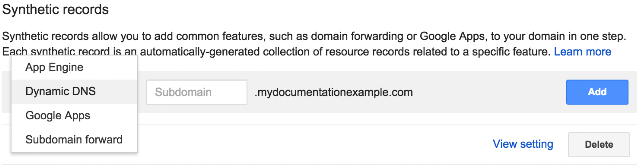
  4. Select Dynamic DNS from the list of synthetic record types.
     
  5. Enter the name of the resource you plan to have assigned a Dynamic IP, either a subdomain or @ for your default domain (“root domain” or “naked domain”).
     
  6. If you selected sub-domain, enter the name of the subdomain.
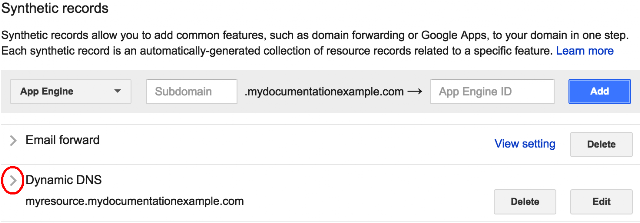
  7. Click Add.
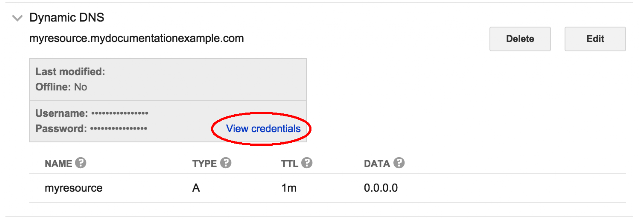
  8. The Dynamic DNS record is created in your list of synthetic records. Click the expand triangle to the left of the record to view its values.
     
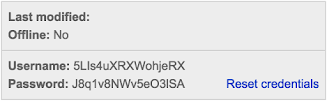
  9. Click View Credentials to view the user name and password created for this record.
  10. Note the username and password created for the synthetic record. You will need these to configure your gateway or client software to contact the Google name servers.
You can edit or delete the record with the Edit and Delete buttons next to the record.

Setting up a client program on your gateway, host, or server

There are several popular dynamic DNS clients in use, such as DDclient and INADYN. In addition most routers have software built in to detect IP changes and communicate them with the name servers.
Note: Google Domains uses the dyndns2 protocol.
Configure your dynamic DNS client with:
  • Provider (or DNS or Service): The name of your DNS Provider.
  • Username: (or credential) the generated username in the Dynamic DNS record.
  • Password (or credential): the generated password in the Dynamic DNS record.
After you have created the record and configured your client software, test it by entering the subdomain and domain into a web browser (or appropriate client) and seeing that it connects to the correct resource.


Google Sites is a tool that lets you easily create websites and wikis using structured templates. You can use a site developed with Google Sites for your domain or a subdomain.
You can connect up to 5 subdomains to any particular Google Site.
To direct your root domain (sometimes called a "naked domain") to a Google Site, you must first connect a subdomain to the site, and then use web forwarding to direct your root domain to the subdomain.

Use your domain as a custom URL for your Google Site

The procedure to use your domain as the domain for a Google Site is different depending on whether your login to Google Domains and your login to Google Sites use the same ID or a different ID. You can see your login ID in the top right corner of your browser window in both Google Domains and Google Sites.

With the same login

Google DomainsGoogle Sites
You must complete steps in both Google Domains and Google Sites:
Note: if you see an error message saying you have not verified domain ownership, Go to the steps for using your domain name With different logins.
Decide on the subdomain you want to be the custom URL for your Google Site, for exampleexamplesite.documentationexample.com. 
In Google Domains:
  1. Click My domains in the navbar and then click the domain name.
  2. Click the DNS tab .
  3. Scroll down to Custom resource records.
  4. Create a new CNAME record:
    • Name: The subdomain you are directing to the site. Not @ or www
    • Type: CNAME
    • TTL: 1h
    • Data: GHS.GOOGLEHOSTED.COM

  5. Click Add to save the record.
     
    In Google Sites:
  6. Log in to Google Sites, and go to the site you are integrating with your domain.
  7. Click on the More Actions menu in the top right corner.


  8. Select Manage Site.
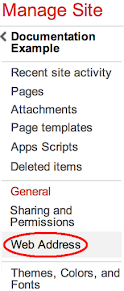
  9. On the left side of the Manage Site page, click Web Address.
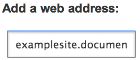
  10. Under Add a web address enter the address of the subdomain you are using, for exampleexamplesite.documentationexample.com.
  11. Click Add at the top of the page to add your address.
    Your address should display in a list below the Google Sites address.
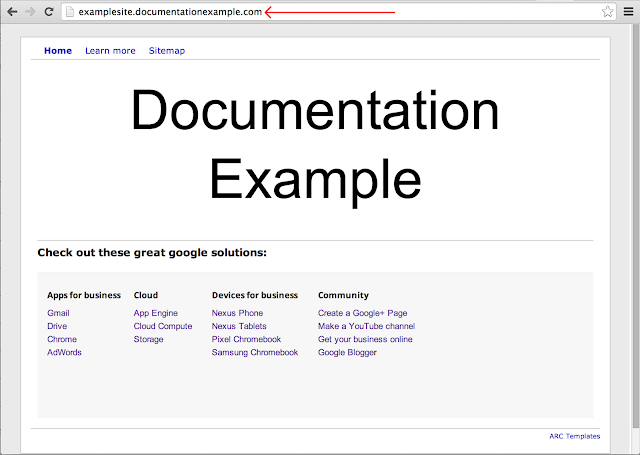
  12. Click on the link for your subdomain to test the results. Your site should display with the your domain as the URL:

With different logins

Google DomainsGoogle Sites
If the login ID you use for Google Domains and Google Sites are not the same, you will have to verify ownership of your domain. This is a security feature designed to prevent unauthorized people from misusing your domain name.
To verify domain ownership and use your domain name with Google Sites, you need to complete steps in Google’s Search Console, Google Domains, and Google Sites.
In Google Search Console:
  1. Go to the Google Search Console at www.google.com/webmasters/tools/ and log into the Search Console with the same login you use for Google Sites.
    Google DomainsGoogle SitesSearch Console
     ↑       SAME       ↑
    You can log in with a different account by clicking your ID in the top right corner of the browser window.
  2. You should see the name of your site listed. Click the ADD A SITE button.
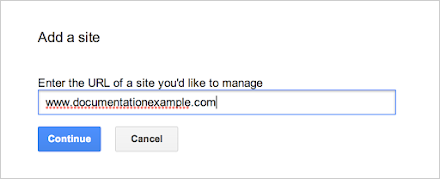
  3. In the Add a site popup, enter your domain with a www subdomain, for example www.documentationexample.com, and click Continue.
  4. In the Verify your ownership of <your domain> screen, select the Alternate methods tab.
  5. In the Alternate methods tab, select Domain name provider.
  6. In the Domain name provider list, select Other at the bottom of the list.
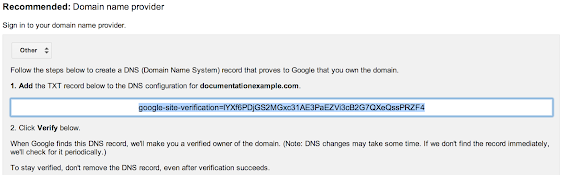
  7. The screen will display a value for a TXT record, a long string of characters starting with “google-site-verification…” Select and copy this value to the clipboard. You may want to paste it into a text window to keep track of it.
  8. Return to the browser tab or window where you have Google Domains open, or reopen Google Domains. Do not close the tab or window with the Search Console Verify ownership screen open.
  9. If necessary, log in to google domains with the account that owns the domain.
  10. In the DNS tab , scroll down to Custom resource records.
  11. Create a new TXT record:
    1. Name: @
    2. Type: TXT
    3. TTL (Time to live): 1h
    4. Data: Paste in the value you copied from Google Apps.
  12. Click Add to save the record. You may need to wait a few seconds for the changes to propagate.
  13. Return to the browser tab or window where the Search Console Verify ownership screen is open.
  14. Click the Verify button to verify your domain.
  15. You should see a congratulations screen telling you you have successfully verified the domain.
    For more help on verifying your domain see the "Verify domain ownership" article in the Google Apps help center.
  16. Click My domains in the navbar and then click the domain name.
  17. Click the DNS tab .
  18. Scroll down to Custom resource records.
  19. Create a new CNAME record:
    • Name: The subdomain you are directing to the site. Not @ or www
    • Type: CNAME
    • TTL: 1h
    • Data: GHS.GOOGLEHOSTED.COM
  20. Click Add to save the record.
  21. Log in to Google Sites, and go to the site you are integrating with your domain. Make sure you are logged in with the same account you used to log in to Google Search Console.
  22. Click on the More Actions menu in the top right corner.
  23. Select Manage Site.
  24. On the left side of the Manage Site page, click Web Address.
  25. Under Add a web address enter the address of the subdomain you are using, for exampleexamplesite.documentationexample.com.
  26. Click Add at the top of the page to add your address. Your address should display in a list below the Google Sites address.
  27. Click on the link for your subdomain to test the results. Your site should display with the your domain as the URL: